Project your sewing pattern straight onto the fabric
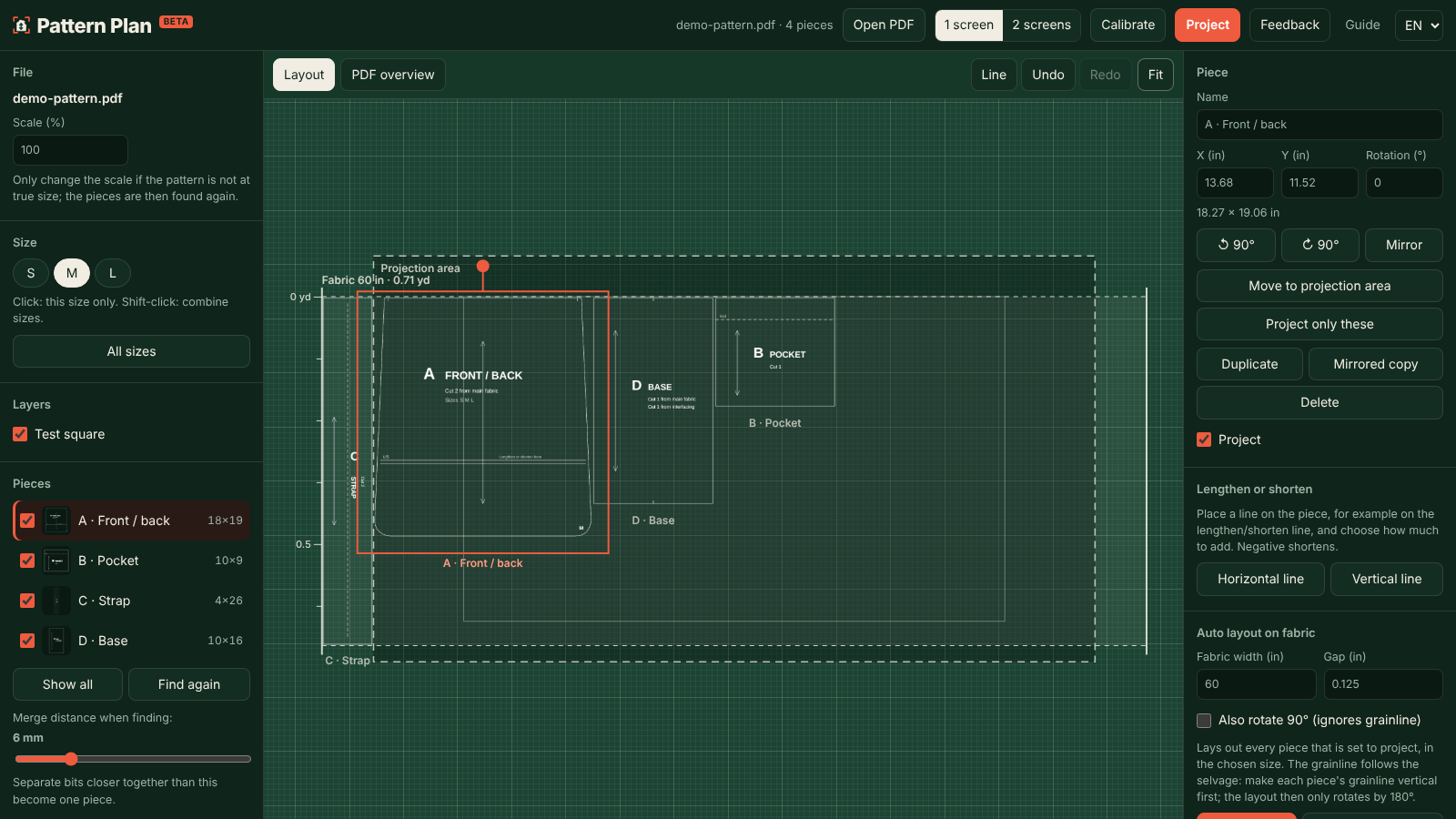
Pattern Plan projects PDF sewing patterns onto your fabric at true size. Open a projector or A0 file, pick your size, and it finds every pattern piece, lays them out on your fabric width and tells you how much fabric you need. Calibrate once, then cut.
Works best in Chrome or Edge on a laptop or desktop, with the projector as a second screen.
No printing, no taping
Skip the stack of A4 pages and the glue stick. The pattern goes from PDF to fabric in minutes.
True size, checked
Four-point calibration corrects a projector that hangs at a slight angle. A 10 cm grid lets you check with a ruler.
Your pattern stays yours
The PDF is opened in your own browser and never uploaded. That's better for your privacy and for the designer's copyright.
Features
What Pattern Plan can do
Projector sewing has a warm, creative community where people share tips, files and tools with each other. Pattern Plan is made to be a friendly part of it: it treats your sewing pattern as separate pieces you can size, adjust and lay out, so you only project what you need.
Finds every piece
All pages are scanned when you open the file. Outlines, notches and labels are grouped into pieces with their names, also when a piece runs over onto the next page.
Pick your size
Size layers in the PDF become buttons. Click one size, or shift-click to combine sizes when you grade between them.
Lays out your fabric
Enter your fabric width and the app nests the pieces with the grainline along the selvage. You see right away how many metres you need.
Lengthen and shorten
Place a line on the lengthen/shorten mark, type how much to add or take away, and the piece adjusts.
Grainline, fold and measure
Draw a line on the grainline arrow and the piece turns to follow the selvage. Draw it on a fold edge and the piece unfolds into a whole one. And measure anything, on screen or on the table.
A4 and Letter patterns too
Tiled patterns are stitched into one sheet: pick the pages and columns, trim the margins until the lines meet, and the pieces are found across the seams.
Arrange freely
Move, rotate, mirror and duplicate pieces for "cut 2". Merge parts, cut out a piece by hand, undo anything.
Laptop, tablet and projector
Keep the controls on your laptop and the projection on the second screen, or project straight from a tablet and move things with two fingers.
Inches or centimetres
Switch units whenever you like. Fabric width, measurements and the grid follow, and fabric length is shown in yards or metres.
How it works
How to project a sewing pattern in four steps
Open your PDF
Drop a projector or A0 file into the app. It finds the pieces for you.
Choose your size
Pick a size, hide what you don't need, and lengthen or shorten.
Calibrate once
Drag four corners onto a rectangle of known size, like the grid of your cutting mat.
Project and cut
Lay out the pieces on your fabric width, project, and cut along the lines.
What you need
A simple setup
- A projector720p or better, connected as a second screen.
- A mount above the tableCeiling, wall, shelf or tripod. Pointing straight down is easiest, but a slight angle is fine.
- A cutting mat with a gridFor calibrating and checking the scale.
- A PDF patternA projector file or A0 file is best. Layered files let you pick your size.
🔒 Nothing is uploaded
Pattern Plan runs entirely in your browser. Your pattern, your layout and your calibration are stored on your own computer, so you can pick up where you left off. No account, no cloud.
Questions
Frequently asked
What is projector sewing?
Projecting a PDF sewing pattern straight onto your fabric with a projector, instead of printing it on A4 or Letter pages, taping them together and tracing. You cut along the projected lines. It saves paper and a lot of time, and you can change size or lengthen a piece without printing again.
Is it free?
Pattern Plan is in beta. During the beta you can try everything free of charge, without an account. Paid options may come later; if so, that will be announced clearly in advance.
What does beta mean?
The app works and is ready to use, but it is still growing. Things may change and you may run into the odd bug. Your feedback helps decide what comes next: report a problem or share an idea.
Is my pattern uploaded anywhere?
No. Your PDF is opened and processed inside your own browser. It is never sent to a server. The last PDF you opened and your layout are kept in your browser's storage, so you can continue later.
Which pattern files work?
Projector files and A0 files work best: one or a few large pages. Tiled A4 or Letter patterns work too: the app recognises them and stitches the pages into one sheet first. Layered PDFs let you pick your size.
Does it work on a tablet?
Yes. Mirror the tablet to the projector and project in the same window. You can pinch to zoom, and move and rotate the projection with two fingers. Calibration has arrow buttons for precise placement.
Can I use inches?
Yes. Switch between centimetres and inches at any time under Units; fabric length is shown in metres or yards.
Do I need a special projector?
No. Any projector you can connect to your computer as a second screen will do. 720p or better is recommended, mounted above your cutting table.
Which browser should I use?
Chrome or Edge on a laptop or desktop computer work best. They can also place the projection window on your second screen automatically.
Does it work offline?
Yes. After your first visit your browser keeps a copy of the app, so it also works without internet, for example in a sewing room without wifi.
Where can I find instructions?
In the guide: setup, calibration, stitching pages, the line tool, laying out and troubleshooting.
Something doesn't work, or I have an idea
Please tell me! Use Report a problem or Suggest an idea. Your PDF is never sent along.
Ready to project your pattern?
Open your own pattern, or try the demo pattern first to see how it works.
Pattern Plan is in beta and grows with the ideas of the people who sew with it. Missing something? Share your idea.